
I’m trying the process from the A8 Parts Forum https://forum.a8parts.co.uk/showthread. ... post176297 (not VCDS) but with no joy at all. I’m confused at 2 points: at which press of the unlock button do you push it more than once; and do you press it twice for the second key as you obviously already have one key that works to have got into the car. Or, if you want a total of 3 keys to work, do you press it 3 times for each programming?
And which key is being programmed? The one in the ignition I assumed, but that could be wrong, I suppose.
I know something is working as, although I’ve failed to programme a second key, another key that previously worked, doesn’t any more, even though it was in the house at the time!
Can anyone help?
Programming keys
Programming keys
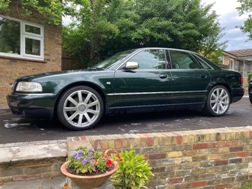
2002 Final Edition S8. Ebony black with Silver Grey leather and myrtle wood trim.
Re: Programming keys
Jim, can you clarify EXACTLY what you are trying to do, e.g.:
How many keys you have.
How many and which will start the car.
How many (which) will unlock/lock remotely.
What you are trying to do with each key.
The immobiliser and remote functions are almost entirely separate.
IIRC if you have at least one (maybe 2?) key that will open the car (with the blade) and start it you can program any/all remotes without needing VCDS.
Pretty sure I've done it, e.g. when I got my current car I reset and reprogrammed the remotes in case there was another key lurking.
How many keys you have.
How many and which will start the car.
How many (which) will unlock/lock remotely.
What you are trying to do with each key.
The immobiliser and remote functions are almost entirely separate.
IIRC if you have at least one (maybe 2?) key that will open the car (with the blade) and start it you can program any/all remotes without needing VCDS.
Pretty sure I've done it, e.g. when I got my current car I reset and reprogrammed the remotes in case there was another key lurking.
Re: Programming keys
Right, here come the answers:
I have 3 keys and, until I started messing around, 2 of them worked fully. The third did not work as a remote, but the batteries are fine.
Whilst mucking about with the fully functioning key to try to programme the one that did not work, the other key that did work previously, stopped working.
Currently, the 2 non-functioning keys will start the car, but it cuts out almost immediately. The remotes do not work on these 2 keys.
I’d like all 3 keys to function fully.
I have 3 keys and, until I started messing around, 2 of them worked fully. The third did not work as a remote, but the batteries are fine.
Whilst mucking about with the fully functioning key to try to programme the one that did not work, the other key that did work previously, stopped working.
Currently, the 2 non-functioning keys will start the car, but it cuts out almost immediately. The remotes do not work on these 2 keys.
I’d like all 3 keys to function fully.
2002 Final Edition S8. Ebony black with Silver Grey leather and myrtle wood trim.
Re: Programming keys
So you've messed up the immobiliser settings somehow.The_Laird wrote: Thu Apr 03, 2025 10:30 am Currently, the 2 non-functioning keys will start the car, but it cuts out almost immediately.
I can't recall how you sort that out, but you will almost certainly need VCDS to do it.
I'd aim to sort that issue out first and ignore the remote programming for now.
Do a VCDS scan and see what it says, it will probably highlight immobiliser issues. Take very good care of the functioning key!
-
MikkiJayne
- Posts: 243
- Joined: Wed Sep 06, 2023 6:26 pm
Re: Programming keys
Its rather odd that the immobiliser is no longer working as there is no manual way to unprogram that - it can only be done via VCDS, and that process will forget all the keys and require them all to be coded in again. Be very very careful with that as you need the PIN code from the ECU which cannot be retrieved by VCDS (or the dealer now). You need some exotic Eastern European tooling to get it.
The key in ignition, press the button on the other one process only does the central locking, or at least it should A coded key should start the car without even having the fob part attached.
The key in ignition, press the button on the other one process only does the central locking, or at least it should
A coded key should start the car without even having the fob part attached.Re: Programming keys
So, the immobiliser setting came back of its own accord, but the remote doesn’t work. So, the first key works fine, the second key will start the engine and unlock the doors manually and the third key starts the engine, but it then cuts out almost immediately. I wish I’d left well alone with 2 fully functioning keys!
2002 Final Edition S8. Ebony black with Silver Grey leather and myrtle wood trim.
-
MikkiJayne
- Posts: 243
- Joined: Wed Sep 06, 2023 6:26 pm
Re: Programming keys
So you should be able to resync the second key with the usual procedure then, which I think is...
Working key in the ignition, ignition on
Lock the driver's door with the second key, then press the lock button
Unlock the driver's door with the second key, then press the unlock button
You might want to verify that though, I think its in the manual in some models, not sure about the D2.
The 3rd key is probably not worth the hassle, but handy to mechanically unlock the car in an emergency.
Working key in the ignition, ignition on
Lock the driver's door with the second key, then press the lock button
Unlock the driver's door with the second key, then press the unlock button
You might want to verify that though, I think its in the manual in some models, not sure about the D2.
The 3rd key is probably not worth the hassle, but handy to mechanically unlock the car in an emergency.
Re: Programming keys
I'm never quite sure about (remote) key syncing, I get occasional weirdness with mine, in fact it happened again yesterday!
I "think" due to accidental in-pocket button presses (buttons do seem very sensitive on my key) my key gets "out of sync" with the car, so I have to revert to manually unlocking/locking. The weird thing is that after a while, and I'm not sure exactly what sequence the system needs for this, it does resync and start working again. Anyone know "the rules"? It happens to me every few months so I'm pretty sure you don't need the second key full process.
AI suggests: If you only have one key available roll down the driver's window (as a safety precaution), step outside, close the door, and manually lock the car with the key in the door barrel. Press the Unlock or Lock button on the fob once, wait a moment, then manually unlock and lock the door with the physical key.
As a footnote, yesterday I grabbed the second key from SWMBO as not having remote locking would have been inconvenient. It hadn't been used in ages but worked fine. Oddly when I started the car with it the HVAC went to LOW on temperature both sides, any thoughts on why that might be, are HVAC settings linked to the key or did something else weird happen, maybe connected to my experiments on the sunroof earlier?
OK panic over ; a quick multi-option test has shown that the HVAC temperatures are linked to the key that starts the car (not the one unlocking). So I guess we last used the second key when the A/C (now regassed) was failing so had set it on LOW. Red Herring......
I "think" due to accidental in-pocket button presses (buttons do seem very sensitive on my key) my key gets "out of sync" with the car, so I have to revert to manually unlocking/locking. The weird thing is that after a while, and I'm not sure exactly what sequence the system needs for this, it does resync and start working again. Anyone know "the rules"? It happens to me every few months so I'm pretty sure you don't need the second key full process.
AI suggests: If you only have one key available roll down the driver's window (as a safety precaution), step outside, close the door, and manually lock the car with the key in the door barrel. Press the Unlock or Lock button on the fob once, wait a moment, then manually unlock and lock the door with the physical key.
As a footnote, yesterday I grabbed the second key from SWMBO as not having remote locking would have been inconvenient. It hadn't been used in ages but worked fine. Oddly when I started the car with it the HVAC went to LOW on temperature both sides, any thoughts on why that might be, are HVAC settings linked to the key or did something else weird happen, maybe connected to my experiments on the sunroof earlier?
OK panic over
; a quick multi-option test has shown that the HVAC temperatures are linked to the key that starts the car (not the one unlocking). So I guess we last used the second key when the A/C (now regassed) was failing so had set it on LOW. Red Herring...... Re: Programming keys
So my recent key sync issues, which resurfaced again today, seem to just be down to failing batteries.MikkiJayne wrote: Tue Apr 22, 2025 8:39 am So you should be able to resync the second key with the usual procedure then, which I think is...
After fitting fresh ones it still didn't work, but this AI-suggested procedure (subtly different to the one above) did:
The Two-Key Manual Synchronisation Method
1. Insert a working key into the ignition switch and turn it to the ON position (do not start the engine).
2. Close and lock the driver’s door from the outside using the second (unmatched/new or desynced) key physically in the door lock cylinder.
3. Press the Unlock button on the remote fob you wish to program once.
4. Wait 6 seconds, then press the Unlock button one more time.
5. The car's central locking should pulse or cycle to acknowledge the sync.
6. Turn off the ignition, remove the first key from inside the car, and test the remote control.